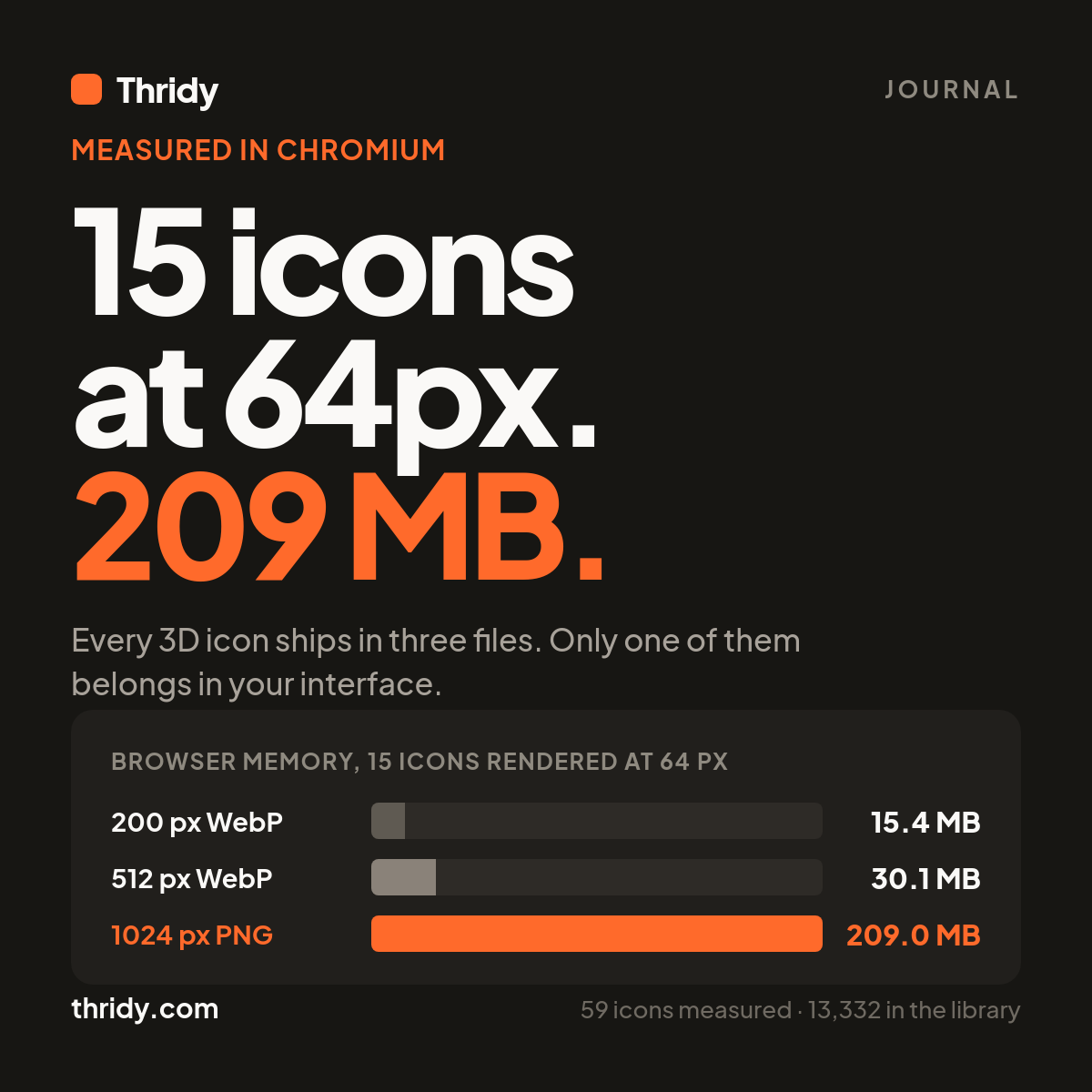
We put fifteen 3D icons on a blank page in Chromium, sized them to 64 pixels, and watched the browser's resident memory climb by 209 MB. Then we loaded the same page with the same fifteen icons at the same 64 pixels, changed nothing but the URL inside each image tag, and the climb was 15 MB.
Nothing a user could see was different. At 64 pixels the two versions are indistinguishable. The only change was which of three files we pointed at, and most people point at the wrong one, because the wrong one is the file labelled download.
Every icon ships in three files
Our API returns three URLs for every icon: a small file, a display file, and a download file. We pulled 60 icons at random from the 13,332 in the library, fetched all three files for each, and decoded them. One icon returned a file our decoder could not read, so the figures below cover 59 icons and 177 files.
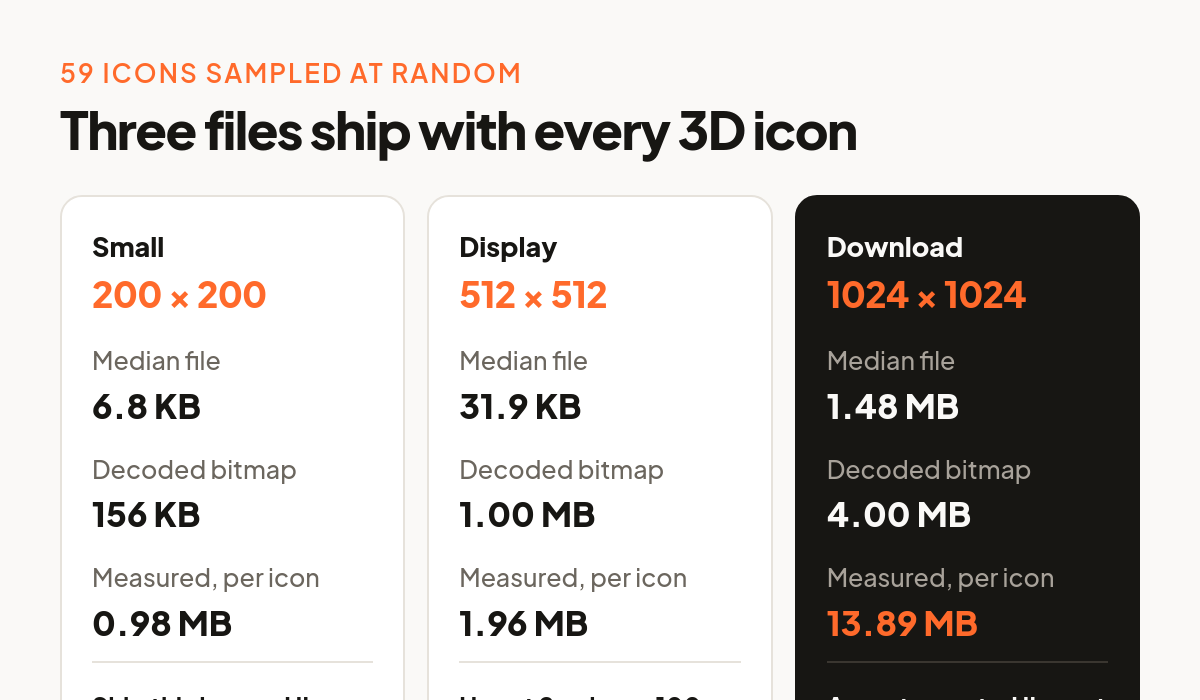
The small file is 200 by 200 pixels, WebP, a median of 6.8 KB across the sample and a range of 3.7 to 14.3 KB. The display file is WebP too, 512 by 512 for 54 of the 59 and 1024 by 1024 for the other five, with a median of 31.9 KB and a long tail out to 157 KB. The download file is PNG at 1024 by 1024 for all 59, a median of 1.48 MB, ranging from 1.27 to 1.94 MB.
That last file is a master. It is the one to open in a design tool, to composite into a marketing render, to hand to somebody who is going to edit it. It is 218 times the size of the small file, and it does not belong in your interface.
What the browser holds is not what you downloaded
A compressed image file is not pixels. It is a set of instructions for reconstructing pixels, and before the browser can paint anything it has to run those instructions and keep the result. That result is a plain bitmap: four bytes per pixel, one each for red, green, blue and alpha. MDN says it directly in its description of canvas pixel data, where "each pixel consists of four values within the data array", stored in RGBA order.
So the decoded size of an icon depends only on its dimensions, and it is exact arithmetic rather than an estimate. A 200 pixel square icon is 160,000 bytes, about 156 KB. A 512 pixel square icon is 1,048,576 bytes, exactly 1 MB. A 1024 pixel square icon is exactly 4 MB.
Notice what that does to the compression ratio you were pleased with. The 6.8 KB small file expands about 23 times when it is decoded. The 31.9 KB display file expands about 32 times. The 1.48 MB PNG expands only 2.7 times, because PNG was barely compressing it to begin with. The better a file compresses, the wider the gap between what you paid for on the network and what you are holding in memory afterwards.
Then we measured it for real. Fifteen icons appended to an empty page, each sized to 64 CSS pixels, decoded and painted and left there. We read the resident memory of every Chromium process before and after, three times per variant, alongside a control run that loaded no images at all. The control moved 0.7 MB. The small files moved 15.4 MB. The display files moved 30.1 MB. The PNG masters moved 209.0 MB, which is 14 times the small files for pixels nobody can tell apart.
Net of the control that comes to 0.98 MB per icon for the small file, 1.96 MB for the display file and 13.89 MB for the PNG. All three are larger than the bitmap arithmetic predicts, and that is expected: a browser keeps more than one buffer per image, including the encoded bytes, the decoded bitmap, and scaled copies used for painting. Treat four bytes per pixel as the floor, not the total.
Decoding is the cost nobody budgets for
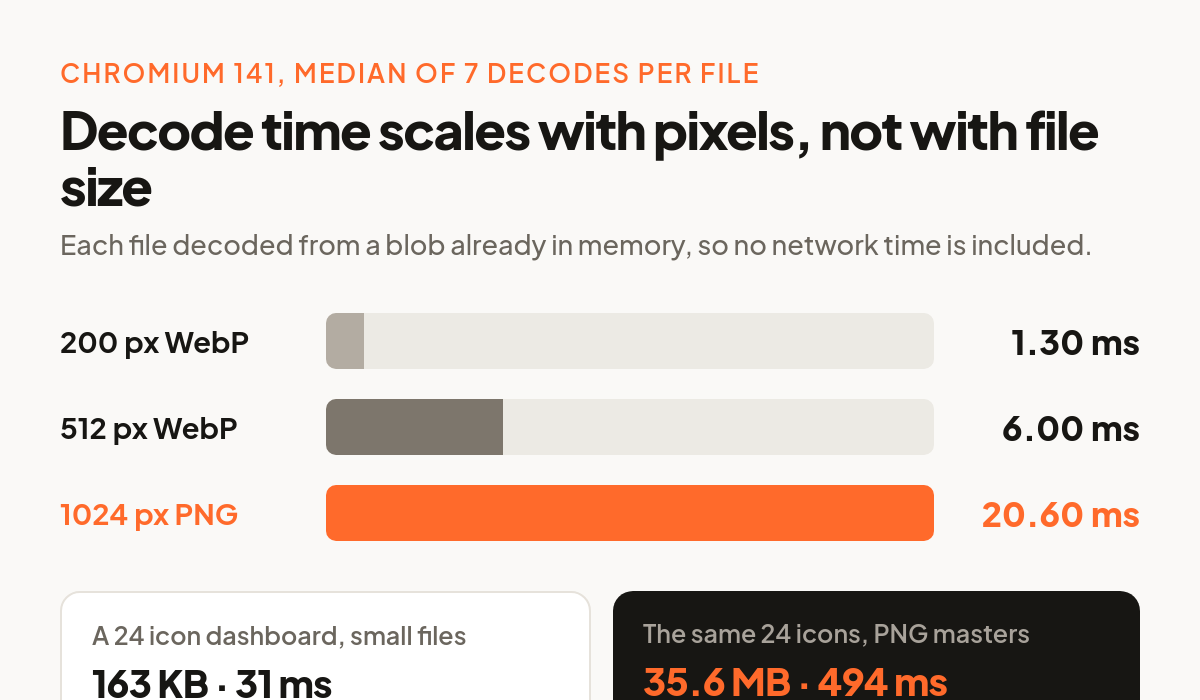
Memory is one half of it. The other is the time spent turning those bytes into a bitmap, and that scales with pixel count as well. We measured it in the same browser, decoding each file from a blob already in memory so that no network time was included, seven runs per file, median taken.
The 200 pixel WebP decoded in 1.30 ms. The 512 pixel WebP took 6.00 ms. The 1024 pixel PNG took 20.60 ms, just under 16 times the small file, with the slowest icon in the sample at 33.90 ms.
Twenty four icons is an unremarkable count for a dashboard with a sidebar and a card grid. Served from the small files, that is 163 KB over the wire and roughly 31 ms of decode work. Served from the PNG masters it is 35.6 MB over the wire and roughly 494 ms of decode, which is half a second of the browser doing work no user asked for.
The 200 pixel file is enough more often than you think
The obvious objection is quality. Small files are cheap because they are small, and a 200 pixel source cannot cover a high density display forever. So we tested where it actually breaks.
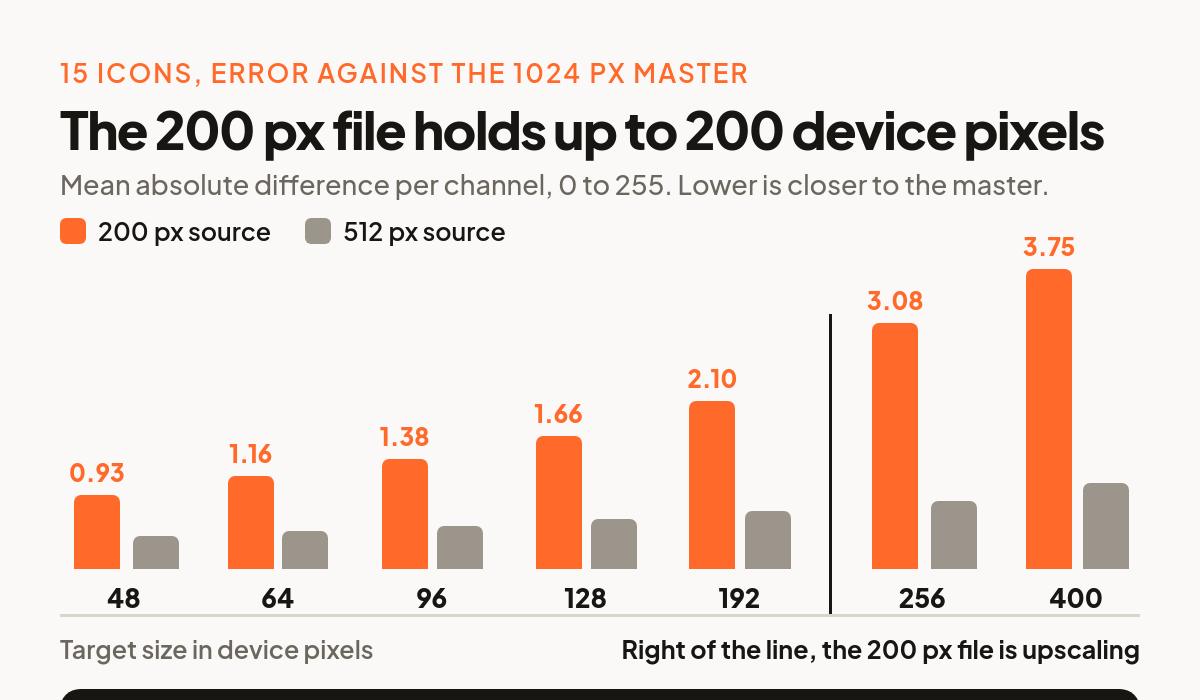
For fifteen icons we downsampled the 1024 pixel master to a target size and treated that as ground truth, then downsampled the 200 pixel file and the 512 pixel file to the same target and measured the mean absolute per channel difference against it, on a 0 to 255 scale.
At a 96 pixel target the 200 pixel file was off by 1.38 out of 255, about half of one percent per channel. At 128 pixels it was 1.66. At 192 pixels, still inside its native resolution, it was 2.10. Past 200 pixels it is upscaling and the error climbs: 3.08 at a 256 pixel target and 3.75 at 400. The 512 pixel file stayed under 1.10 across the whole range.
Translate that into device pixels, which is the number that matters. An icon in a 48 CSS pixel slot on a 3x phone needs 144 real pixels. A 64 pixel slot on a 2x laptop needs 128. A 96 pixel slot on a 2x display needs 192. All three fit inside the 200 pixel file with room left over. The 512 pixel file covers a 256 CSS pixel slot at 2x, which is feature illustration territory rather than interface. The embed sizes our API advertises stop at 512 for the same reason.
What to put in your markup
Give the browser both WebP files and let it pick by pixel density. The srcset attribute is built for exactly this. MDN describes the density descriptor as "a positive floating point number directly followed by x" that "specifies the condition in which the corresponding image resource should be used as the display's pixel density".
For an icon rendered at 64 CSS pixels, point src and the 1x entry at the small file and the 2x entry at the display file, so a standard screen downloads 6.8 KB and a retina screen downloads 31.9 KB. Set width and height on the element so the layout does not shift while the file arrives. Add loading="lazy" to anything below the fold, which as MDN puts it "avoids the network and storage bandwidth required to handle the image until it's reasonably certain that it will be needed". Then leave the PNG where it belongs, behind the download button.
If you are shipping icons at a single fixed size and want one file rather than two, use the small file. At every interface size we tested it is within one percent of the master, and it is the only one of the three that stays under 1 MB of browser memory per icon.
How we measured this
Sixty icons were drawn from random pages of our public icons endpoint and their three files fetched from our CDN. Byte sizes and dimensions come from those files directly. Decoded bitmap sizes are arithmetic, width times height times four bytes.
Decode timing and memory were measured in headless Chromium 141 on Linux, serving the already downloaded files from localhost so that network latency played no part. Decode used createImageBitmap on a blob, seven runs per file with the median reported. Memory was the summed resident set of all Chromium processes, sampled two seconds after the last icon finished decoding and painting, three runs per variant with a no image control. Resident set size is a blunt instrument and it includes more than image buffers, which is why the control run is there and why the numbers are reported net of it.
Quality was compared with Lanczos resampling, using the 1024 pixel master downsampled to each target as ground truth. Every figure in this article came from those measurements, taken on the same afternoon, against the same 13,332 icon library.
If you want the other half of this story, the transfer side, we went through it in Your 3D Icon Is 1.45 MB. It Should Be 4 KB.
Free 3D icons for this
Every icon on Thridy is free to download and use. A few that fit this piece:
- Red Rocket 3D icon
- Percentage 3D icon
- Quinceanera 3D icon
- Face Paint Kit 3D icon
- Fez Hat 3D icon
- Top Hat 3D icon
Browse all 2,600+ free 3D icons or explore them by category.