If your product puts a grid of 3D icons on screen, the person who comes back tomorrow does not get them for free. Somewhere between "already downloaded" and "download it all again" sits a single response header, and most teams never look at which one their icon host is sending. We went and measured ours.
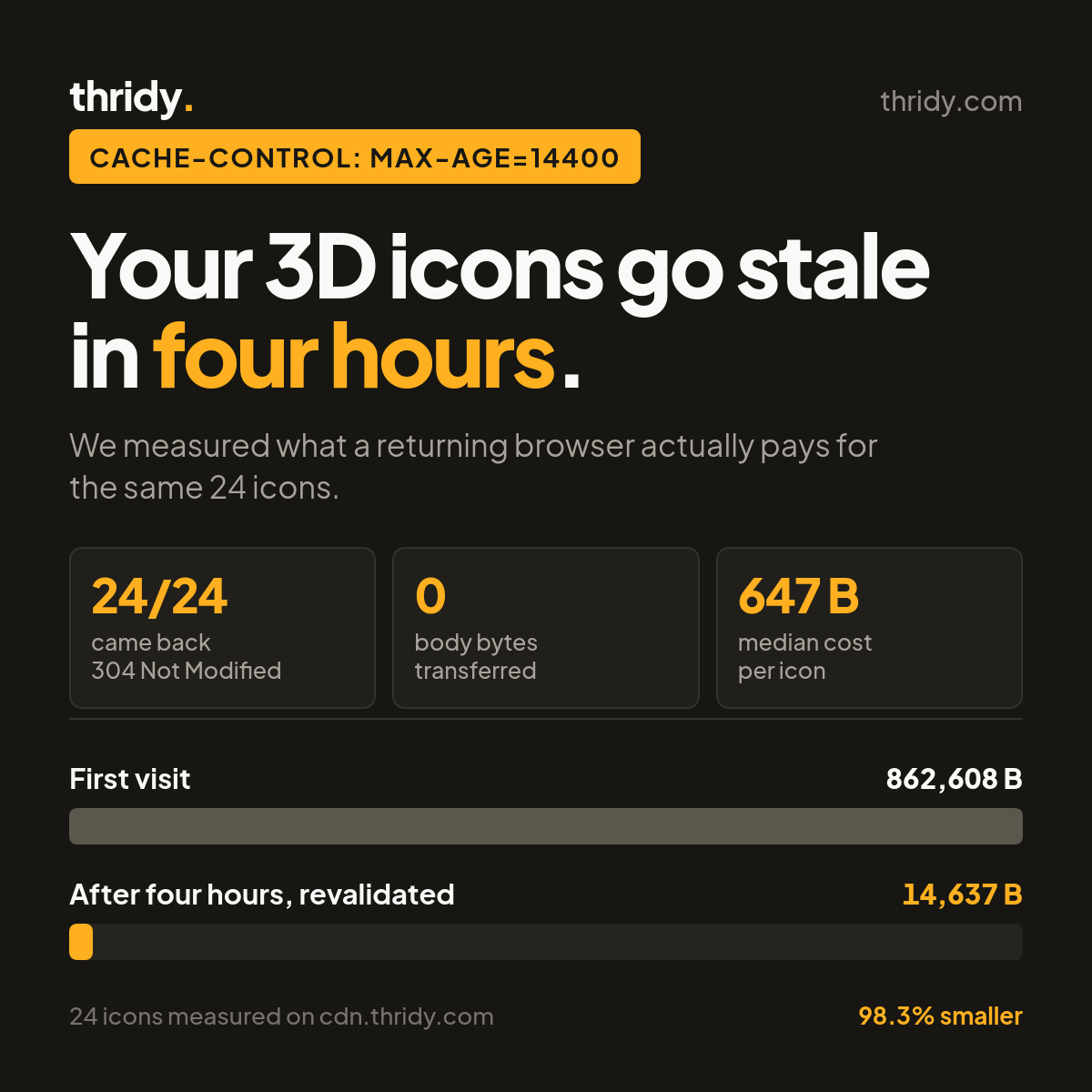
The short version: every file on our CDN is fresh for four hours. Inside that window a returning browser makes no network request at all. Outside it, the browser asks again, and a 24-icon grid that costs 862,608 bytes on the first visit costs 14,637 bytes on the next. That is a 98.3 percent reduction that nobody has to write any code to get, and a smaller one than we could be handing you. Here is the whole measurement.
What our CDN actually sends
We took 50 icons from our own API and inspected the response headers on every asset. All three file variants we serve came back identical on the part that matters:
cache-control: max-age=14400, plus an ETag, a Last-Modified date, HTTP/2, and an alt-svc advertising HTTP/3. Our JSON API is slightly different, sending public, max-age=14400, s-maxage=300, stale-while-revalidate=3600, which lets our edge serve a slightly stale category list while it fetches a fresh one behind your back.
14400 seconds is four hours. That number is the entire story of what a second visit costs, so it is worth being precise about what it means.
Four hours, and then what
RFC 9111, the current HTTP caching specification, defines the directive plainly: "The max-age response directive indicates that the response is to be considered stale after its age is greater than the specified number of seconds." Before four hours the icon is fresh, and a fresh response is served straight out of the browser's own cache with no request on the wire. After four hours it is stale, which does not mean wrong and does not mean deleted. It means the browser has to check.
That check is the interesting part, because a stale icon is almost never actually out of date. Our icons change when we redraw them, which is close to never. So the browser asks a question it already knows the answer to, and the only real question is how much that costs.
A stale icon costs 647 bytes, not 30,001
We re-requested all 50 icons with an If-None-Match header carrying the ETag we had just been given. All 50 came back 304 Not Modified. Not one of them sent a body.
The median 304 was 647 bytes of headers with zero bytes of payload. The full responses those 304s replaced were a median of 30,001 bytes each. Across the 50-icon set, revalidating everything moved 32,363 bytes where downloading everything would have moved 1,820,222. That is 56 times less data to learn that nothing changed.
So the four-hour expiry is not the disaster it might sound like. A returning visitor after four hours is not re-downloading your icon set. They are spending about 650 bytes per icon to confirm it.
The grid test
Per-file medians are tidy but they are not what a page does. A page asks for many icons at once over a shared connection, so we built the realistic version: 24 icons, up to 6 parallel connections, edge already warm, measured end to end.
Downloading all 24 took 0.74 seconds and moved 862,608 bytes including headers. Revalidating all 24 took 0.33 seconds and moved 14,637 bytes, all of it headers, with 24 out of 24 responses coming back 304. The transfer dropped 98.3 percent and the wall clock roughly halved.
Worth naming the thing that did not improve as much: the time only halved while the bytes fell by a factor of 59. Revalidation still costs a round trip per file, and round trips do not shrink just because the payload does. On a fast connection the bytes are irrelevant and the latency is the bill.
The first visit is a completely different bill
None of the above helps the person seeing your page for the first time, and that is where the real weight is. Every icon in our library exists as three separate files, and they are not close in size.
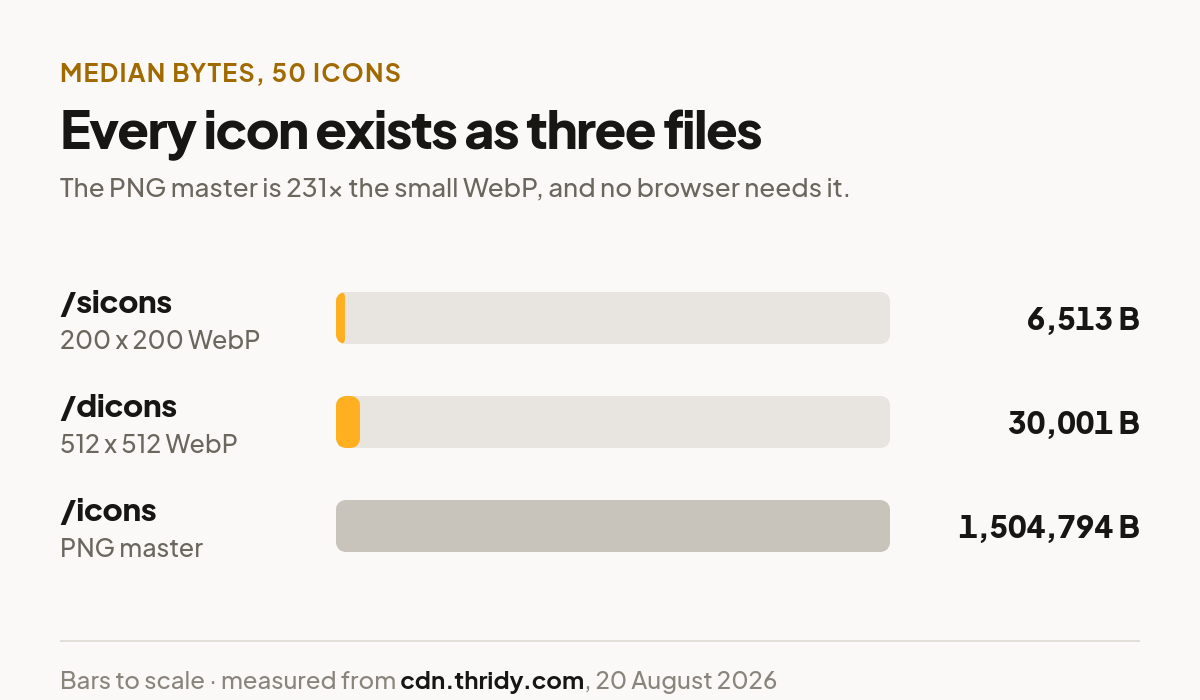
We measured all three across the same 50 icons. The small WebP at /sicons is 200 by 200 pixels and a median 6,513 bytes. The display WebP at /dicons is 512 by 512 for 18 of the 20 we measured dimensions on, 1024 by 1024 for the other two, and a median 30,001 bytes. The PNG master at /icons is a median 1,504,794 bytes.
Put that in grid terms. Fifty icons as small WebP is 341 KB. The same fifty as display WebP is 1.74 MB. The same fifty as PNG masters is 72.8 MB. The PNG is a download link for someone opening the file in a design tool, not an asset for a web page, and the 231x gap between it and the small WebP is the single largest decision on this list.
If your icons render below roughly 100 pixels, use Icon Small Link. Reaching for Icon Display Link because it sounds like the default one costs you 4.6 times the bytes for detail that a 48-pixel slot cannot show.
The edge is doing its job
One thing we were glad to confirm. On first request, 49 of our 50 icons reported cf-cache-status: MISS, meaning the edge had to reach back to origin. On the immediate second request, 50 out of 50 reported HIT.
The latency difference is real: median time to first byte fell from 0.644 seconds cold to 0.132 seconds warm, close to a 5x improvement. This is edge caching, which is separate from browser caching and helps a different person. Browser caching helps the same visitor come back. Edge caching helps the next visitor, in the same region, who has never seen your page.
What we would change, and it is our fault not yours
Four hours is too short for what we serve, and our own filenames prove it. Of the 50 display URLs we sampled, 32 end in an 8-character content hash, like 100-points-844f84aa.webp. A hashed filename is a promise that the bytes at that URL will never change, because different bytes would produce a different name.
For a URL like that, revalidating every four hours is pure waste. The correct header is a long max-age plus immutable, defined in RFC 8246, whose whole purpose is that clients "SHOULD NOT issue a conditional request during the response's freshness lifetime (e.g., upon a reload)". That turns our measured 14,637 bytes and 24 round trips into zero of both.
The remaining 18 of 50 have unhashed names like 12-30.webp, and those genuinely should keep a short max-age, because that URL could one day hold a redrawn icon. Splitting the two is work on our side, and we are writing it down here rather than quietly fixing it because the current behaviour is what you are getting today.
Check it yourself, but not with curl -I
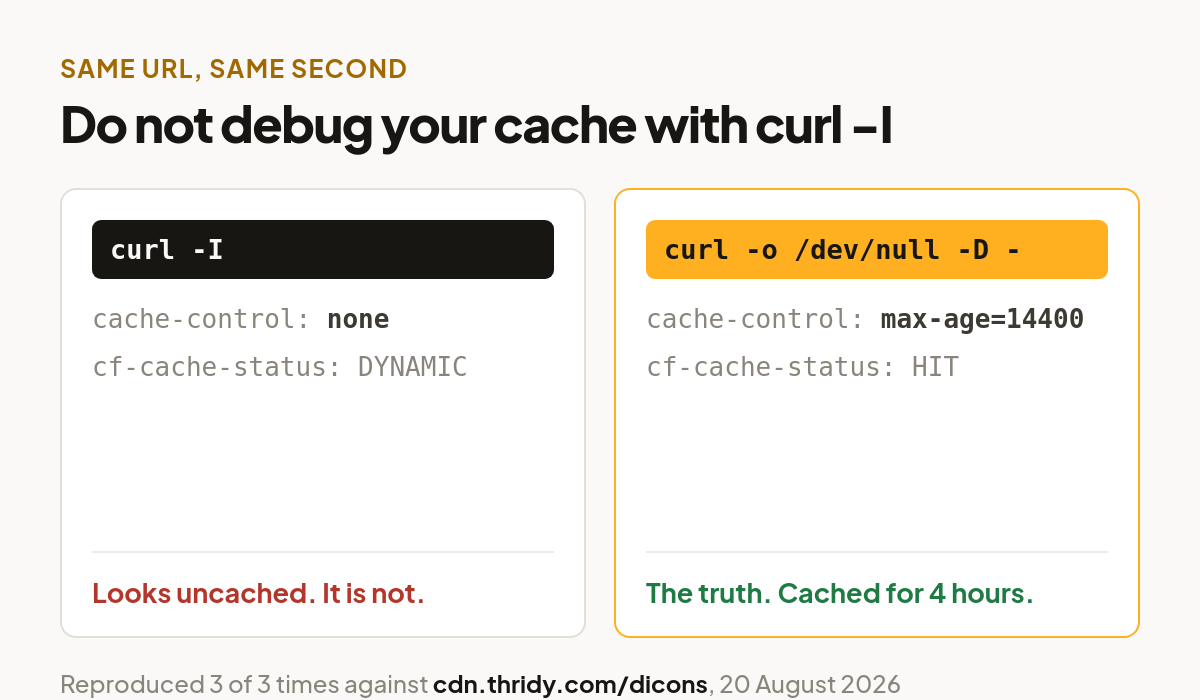
We nearly published a much angrier version of this article, because our first look used curl -I and reported no cache-control header at all and cf-cache-status: DYNAMIC, which reads as "this CDN caches nothing".
That was wrong, and reproducibly so. Three HEAD requests and three GET requests to the same URL in the same minute disagreed every single time: HEAD showed no cache-control and DYNAMIC, GET showed max-age=14400 and HIT. If you are auditing any CDN, ask for the headers on a real GET, not a HEAD:
curl -sS -o /dev/null -D - https://cdn.thridy.com/dicons/100-points-844f84aa.webp
Then repeat it with -H 'If-None-Match: "<the etag>"' and confirm you get a 304 with an empty body. Two commands, and you know precisely what your returning users pay. We would rather you ran them against us than took our word for it.
Free 3D icons for this
Every icon on Thridy is free to download and use. A few that fit this piece:
- Blog Post 3D icon
- WebP File 3D icon
- KYC 3D icon
- Number 4 3D icon
- Number Four 3D icon
- Four Fingers 3D icon
Browse all 2,600+ free 3D icons or explore them by category.