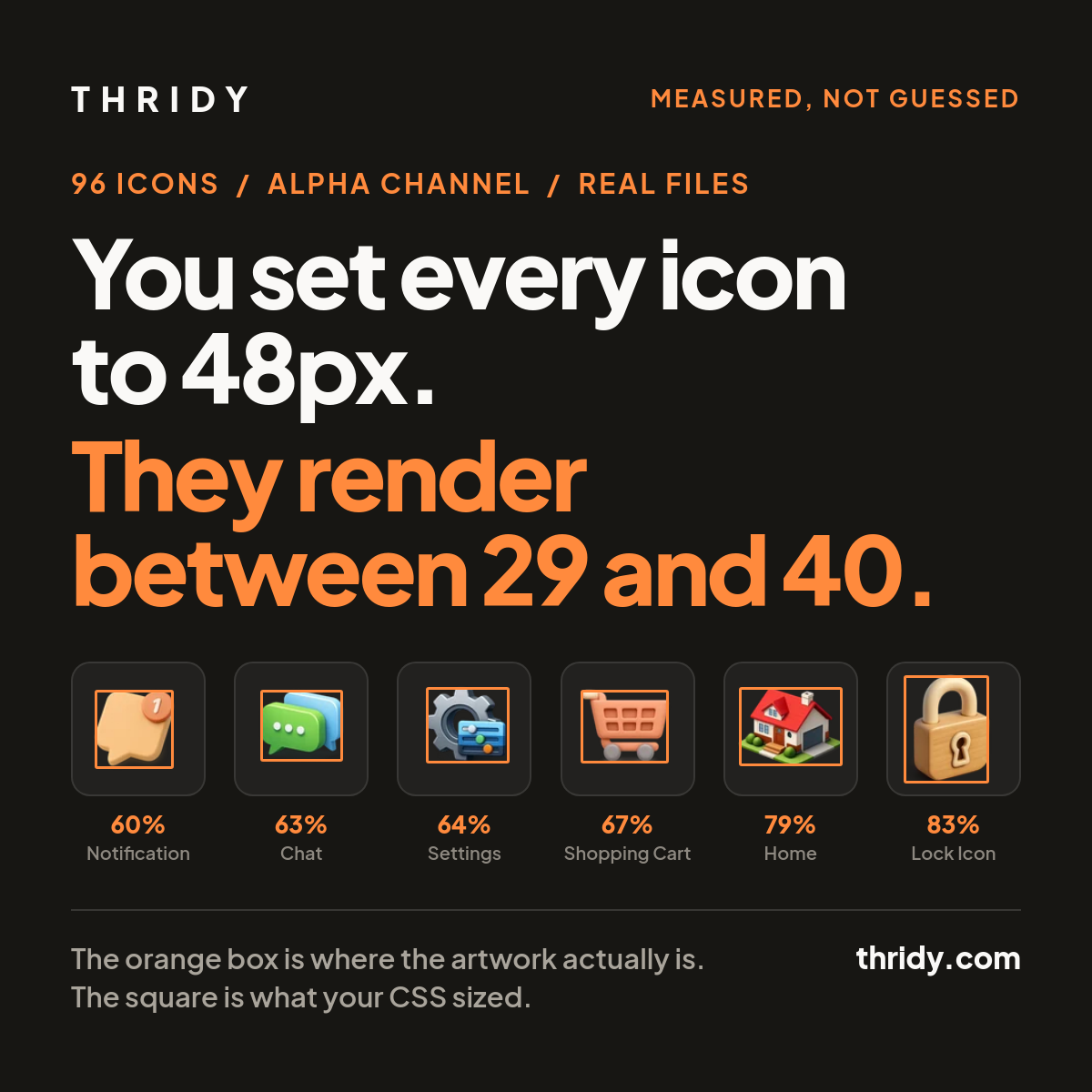
Put twelve 3D icons in a row, set every one of them to 48 pixels, and look at the result. One or two read as too big. Two or three look shrunken. Your CSS is not wrong and your grid is not wrong. The size you set is the size of the file, and the drawing inside the file is a different size in every icon.
We wanted to know how much different, so we measured it. Across 96 icons sampled from across our library, the artwork fills between 58.2% and 100% of the square it ships in. In a realistic toolbar row of twelve, a 48 pixel box produced icons drawn between 28.8 and 39.9 pixels on their longest side. Same CSS, same box, a 1.39x difference in what the eye actually sees.
What we measured, and how
We took the icon list from our own API and sampled it evenly: 12 pages spread across the 267 pages of results at 50 icons per page, then the first 8 icons from each page. That is 96 icons drawn from the 13,332 in the library. We fetched each display file from our CDN and read its alpha channel, treating any pixel with an alpha value above 8 out of 255 as painted.
That gives three numbers per icon. The canvas is the file's own pixel dimensions. The artwork box is the tightest rectangle containing every painted pixel. Fill is the longest side of the artwork box divided by the canvas side, which is what decides how large an icon looks once a browser has fitted the file into a square.
One honest caveat about the sample. Our listing is alphabetical, so 12 evenly spaced pages give 12 clusters of alphabetical neighbours rather than 96 independent draws. One cluster turned out to be five Skoda car models, which are near identical in construction. Treat the spread as real and the exact medians as approximate.
The artwork fills between 58% and 100% of its box
Median fill across the 96 was 76.4%. The tightest was Finish Flag at 58.2%, a 512 by 512 file carrying a 296 by 298 drawing in the middle of it. Two icons reached 100%, Magnifying Glass and Bus Driver Avatar, where the artwork runs edge to edge on one axis. Largest over smallest is 1.72x.
This is not a tail problem you can ignore. Only 36% of the sample sits within 5% of the median fill. 61% sit within 10%, and 75% within 15%. A quarter of the icons are more than 15% away from the middle, which is comfortably enough to notice when they sit side by side.
The empty space is larger than it sounds. The median icon had 53.9% of its canvas outside the artwork box entirely, and 68.8% of its pixels fully transparent. Roughly two thirds of a typical icon file is nothing at all.
A real toolbar row, at 48 pixels
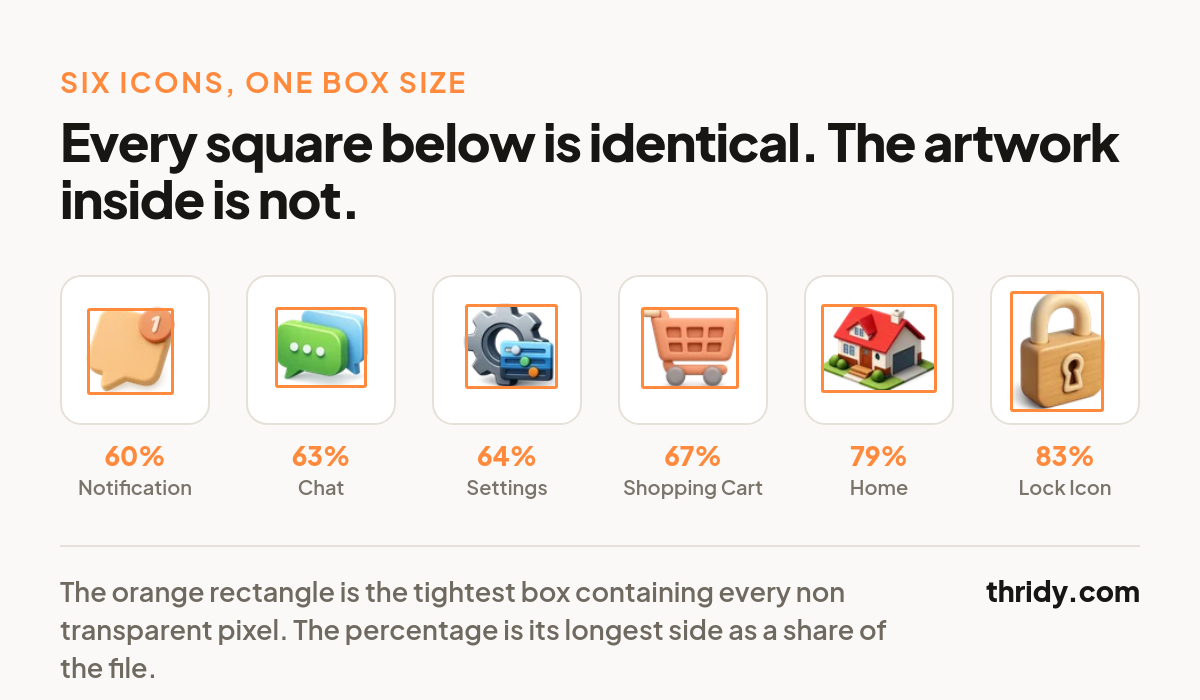
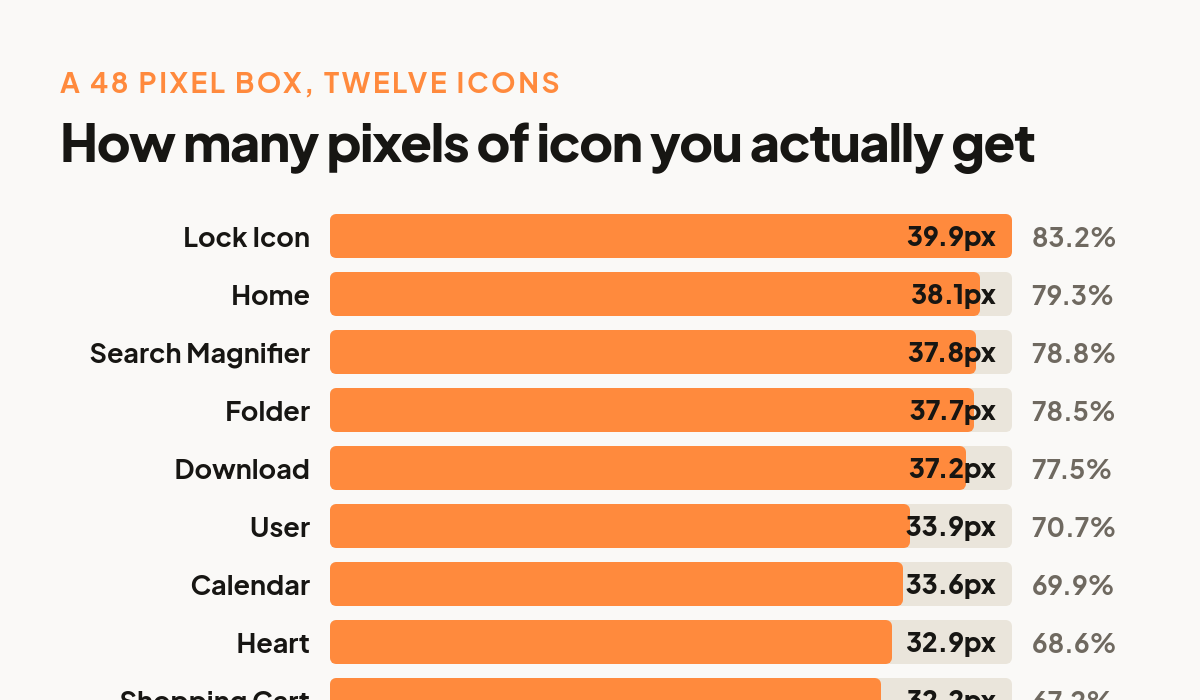
Library-wide averages are interesting, but nobody ships a random sample. So we built the row a real product would ship: home, search, settings, user, notification, chat, calendar, folder, shopping cart, heart, download, lock. Twelve icons, picked by name from our search endpoint, then measured the same way.
Fill ranged from 60.1% for Notification to 83.2% for Lock Icon. Drop those into an identical 48 pixel box and Notification draws 28.8 pixels while Lock Icon draws 39.9. Notification is not a small icon by design. It is simply carrying more transparent margin, and the browser has no idea.
Painted area is the bigger gap
Longest side understates the problem, because what the eye weighs is closer to area than to width. Counting only painted pixels, our 96 icons ranged from 8.2% of the canvas (Hockey Stick) to 46.4% (Raksha Bandhan). That is a 5.63x spread in visual mass inside boxes you told the browser were the same size.
Density inside the artwork box varies just as much: Billiard Cue paints 16.4% of its own bounding box because it is a thin diagonal line, while Burrito paints 88.1% of its. Two icons can share an identical artwork box and still look nothing alike in weight. In the toolbar row the effect is milder but still there, from 550 painted square pixels for Shopping Cart to 1,007 for Calendar, a 1.83x range.
The browser is doing exactly what you told it to
It is tempting to blame CSS here. Do not. The W3C CSS Images Module Level 3 defines object-fit: contain as sizing replaced content so that it "maintains its natural aspect ratio while fitting within the element's content box". The same spec notes that natural dimensions "represent the preferred sizing intrinsic to the object itself". For a raster file those natural dimensions are the full canvas, transparent margin included. The browser fits the file perfectly. The file just is not the drawing.
There is a CSS property built for this. object-view-box lets you declare a view box into an image and crop the padding away without touching the source. MDN currently marks it as Limited availability and says plainly that it "is not Baseline because it does not work in some of the most widely-used browsers". Reach for it when you can afford to, but do not build your icon sizing on it yet.
The fix is one number per icon
Measure the artwork box once, store one scale factor per icon, and apply it at render time. Pick a target fill, say 80% of the box, and the factor is simply the target divided by that icon's measured fill. Applying that to our twelve icon row produced scale factors from 0.962 for Lock Icon up to 1.332 for Notification, and every icon then drew at 38.4 pixels inside the same 48 pixel box. The spread went from 1.39x to 1.000x.
Two practical notes. Apply the scale with a CSS transform on the image inside a fixed size box, because transforms do not affect layout and your grid stays exactly where it was. And run the measurement as a build step against the files you actually ship, not by hand, because a value typed once will be wrong the moment an icon is redrawn.
Fit to the box, or fit to the area?
There are two reasonable rules and they disagree. You can normalise by the artwork box, scaling until the longest side hits your target. Or you can normalise by painted area, scaling by the inverse square root of the painted fraction so every icon carries the same visual mass. We ran both across the toolbar row and compared them.
They agreed almost exactly on Search Magnifier and Settings, and diverged badly elsewhere: 19.7% apart on Calendar, 12.6% on Home, 12.1% on Notification. Neither is correct in the abstract. Box fitting is the safer default because it never lets an icon overflow its slot, and it is the one we would start from. Area fitting is worth trying for sparse icons like line tools and thin objects, which box fitting leaves looking faint. Whichever you pick, look at the row afterwards, because this is the one part of the job a number cannot finish for you.
Three more things worth checking before you ship
Canvas size is not uniform. Of our 96, 88 were 512 by 512 and 7 were 1024 by 1024, which is harmless since fill is a ratio. But one, Hokusai's The Great Wave, is 1024 by 1536. A non-square file in a hard coded square box either letterboxes or crops depending on your object-fit, so never assume the aspect ratio.
Vertical centring is already fine. We expected 3D icons to sit low in their frames because of the way they are lit and shadowed. They do not. The median artwork box sat 1.71% of the canvas from centre, and the worst was 5.22%. At 48 pixels that is 0.8 pixels typical and 2.5 pixels at the extreme. This is not worth engineering around, and we are glad to be able to say so rather than guess.
Aspect ratios are wide. Artwork boxes ranged from 0.56 wide-to-tall (Zipper Dress) to 2.14 (Orange Sand Dune), with a median of 1.06. That is why the scale factor has to key off the longest side rather than height. Normalise on height alone and every wide icon in your set will burst out of its slot.
Run it on your own set
None of this needs our library. Everything above came from one loop: fetch the file, read the alpha channel, take the bounding box of pixels above a small alpha threshold, divide by the canvas. Twenty lines and a few seconds per hundred icons. If you are mixing icons from more than one source, run it before you commit to a set, because the mismatch between two libraries is usually far worse than the mismatch inside one.
We are running it across all 13,332 of ours. The measurement is the easy half. The interesting half is that until you take it, you are sizing your interface by a number that describes the file rather than the picture, and no amount of care in the CSS will tell you the difference.
Free 3D icons for this
Every icon on Thridy is free to download and use. A few that fit this piece:
- Keychain 3D icon
- Chain Wallet 3D icon
- Bagel Seasoning 3D icon
- Multitool 3D icon
- Pineapple Hand Grenade 3D icon
- 35mm Slide 3D icon
Browse all 2,600+ free 3D icons or explore them by category.